
← Back to blog
Inside the Axon to Axoniq Framework Split: What Changes, What Doesn't, and Why
What's the difference between Axon Framework and Axoniq Framework? A four-line migration, a sequenced DLQ, and a new snapshot policy API.
This blog is for engineers and architects already using Axon Framework who want to understand the repository split, the new Axoniq Framework commercial repository, and how to start using the sequenced dead letter queue and snapshot policy APIs.
Key takeaways
Axon Framework split into two repositories in Q1 2026: open-source Axon Framework for the event-sourcing foundation, and commercial Axoniq Framework for production-grade extensions.
Migration is a four-line dependency addition. Existing Axon Framework code continues to work unchanged.
Updates within Axoniq Framework: a sequenced dead letter queue equivalent now in AF5, a snapshot policy API that replaces SnapshotTriggerDefinition, and the extendWith configuration pattern.
If you've been building on Axon Framework, you know the drill: events, aggregates, handlers, the whole CQRS/ES toolbox. It's been in production since 2009, it's been downloaded more than 70 million times, and the open-source repository isn't going anywhere.
But the framework has also been carrying weight that doesn't belong in an open-source core. Things that production teams need: sequenced dead letter queues, advanced snapshotting, durable workflow primitives, and deeper integrations, that were sitting in the same codebase as the foundational event-sourcing model. We have many features that were production grade and required a lot of maintenance of the team. Maintenance we couldn't justify being paired in the scope of the base-event-sourcing-support. Hence, we decided to split the frameworks, allowing the team to give either piece the justice they deserve.
What is the difference between Axon Framework and Axoniq Framework?
Axon Framework remains open source and contains the event-sourcing foundation;
Axoniq Framework is the new commercial repository that holds the production-grade extensions like dead letter queues, snapshot policies, and workflow primitives and other production-grade extensions, like the PostgreSQL Event Storage Engine and Axon Server connectivity.
Steven van Beelen explains the Axon to Axoniq Framework split, the new sequenced DLQ, and snapshot policies.
This post walks through what actually moved, what the migration looks like from a developer's seat, and the two specific features we want to call out from the Q1 release: the revamped Dead Letter Queue integration and the new Snapshotting policy model.
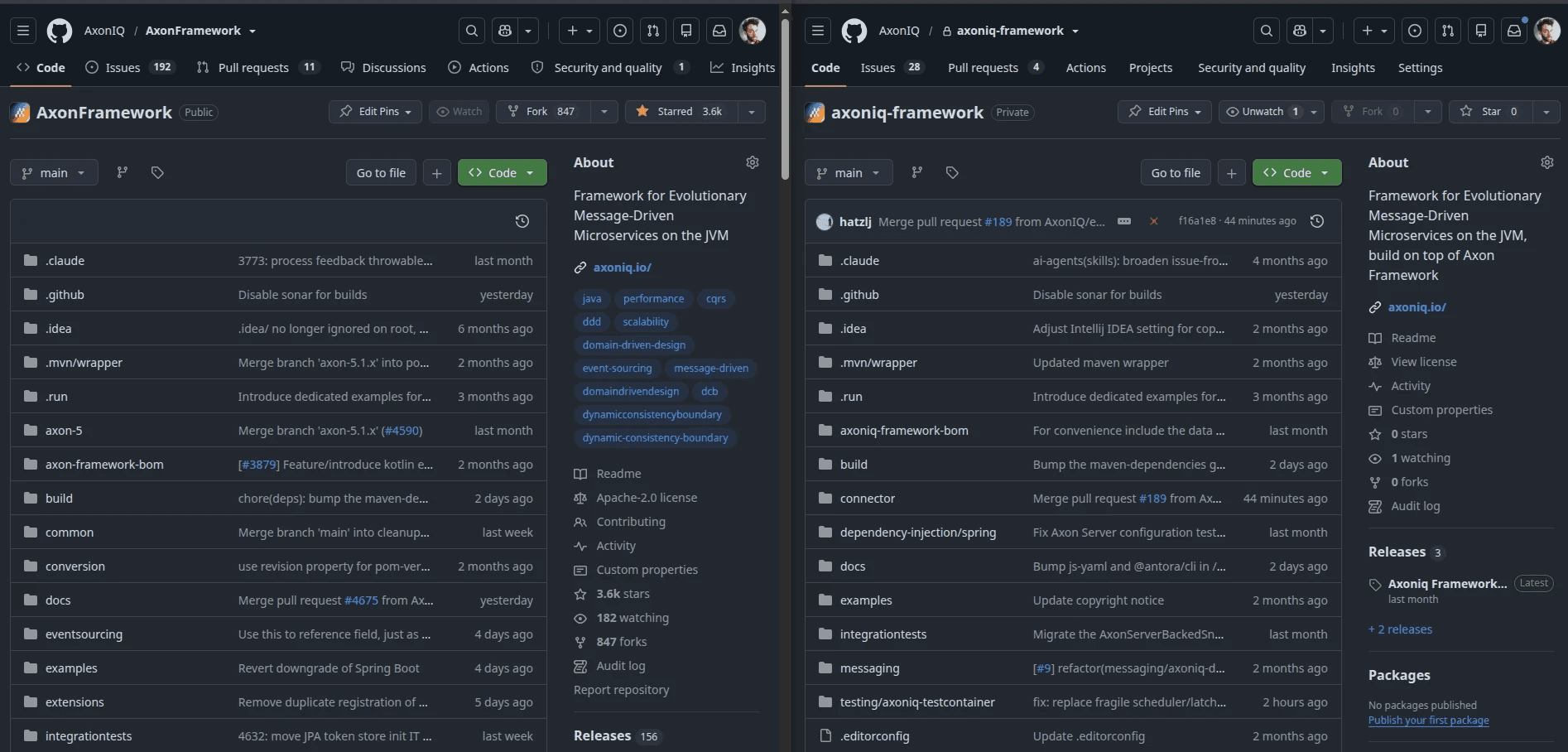
What the split looks like from your IDE
How do you migrate from Axon Framework to Axoniq Framework? It's a four-line dependency addition. You add the Axoniq Framework dependency alongside the Axon Framework one in your pom.xml or build.gradle, and you get both.
That's the whole migration. You add the Axoniq Framework dependency alongside the Axon Framework one, and you get both. After this, the advanced features become available, and the foundational APIs you already use keep working, helping make this a relatively seamless transition.
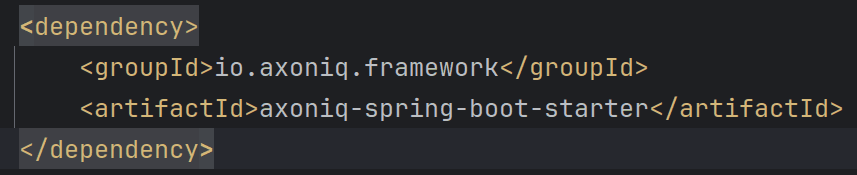
Replace the Axon Framework Spring Boot starter dependency for the Axoniq Framework version, and you are done!
One thing we want to emphasize: this isn't a rip-and-replace. You aren't being asked to migrate to a new framework. You're adding a layer on top of the one you already have.
Feature 1: Sequenced Dead Letter Queue (now in Axoniq Framework)
What is a sequenced dead letter queue? A sequenced dead letter queue (DLQ) is a holding area for failed events that preserves causal order. When one event in a sequence fails, all subsequent events in that same sequence are also queued, preventing out-of-order processing. This is different from a generic DLQ, which only queues the single failed message.
For anyone who hasn't run into the term: without a DLQ, a single failing event handler can block your entire event stream, and every subsequent message stalls behind the one that keeps retrying. With a DLQ, that one failing message gets parked off to the side, the stream keeps moving, and you can deal with the failure separately. No engineer needs to be on-call to babysit it.
Most messaging buses have some kind of dead letter queue. What's different in the Axoniq Framework DLQ is that it's sequenced.
Here's why that matters. In an event-sourced system, events aren't independent, many of them belong to the same logical sequence (the same order, the same customer journey, the same aggregate). If event #3 in a sequence fails, you can't just keep processing events #4, #5, #6 against the same aggregate. Their meaning depends on #3 having been applied first. So when our DLQ catches a failed event, it also parks any subsequent events that belong to the same sequence, preserving causal correctness while letting the rest of the system run.
Most other DLQ implementations don't do this. They're generic, where Axoniq’s is sequenced.
Deep-dive on the sequenced DLQ configuration in Axoniq Framework.
Configuring a sequenced dead letter queue in Axoniq Framework
This is also a chance to introduce a new pattern you'll see more of in the months ahead. Because the DLQ now lives in Axoniq Framework rather than Axon Framework, we couldn't bake its configuration into the event processor configuration directly, that would create a circular dependency. So we built a new way to extend an event processor's configuration with additional configuration blocks:
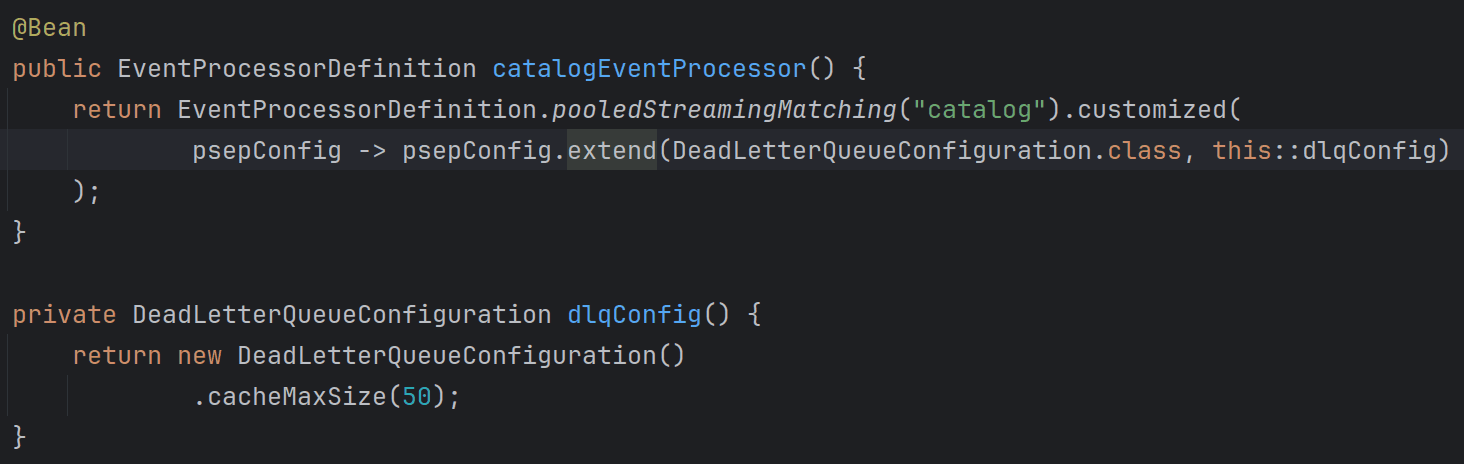
You'll see this extendWith pattern reused across other modules going forward. It's the general mechanism for layering Axoniq Framework configuration on top of Axon Framework's processor model without coupling the two repositories
Feature 2: Snapshot policies replace SnapshotTriggerDefinition
The other thing worth showing is how snapshotting works in Axoniq Framework 5.
If you're new to it: in an event-sourced system, reconstructing the current state of something, like a warehouse, an order, or a gift card, means replaying all the events that ever happened to it. That works fine until you've got an entity with ten thousand events. Then loading the current state means reading ten thousand records off the wire, which is potentially slow and most likely wasteful. A snapshot is a periodic save of the current state, so you can load the snapshot and then only replay the events that happened after it. It's a performance optimization. Less data over the wire, faster reads, faster decisions.
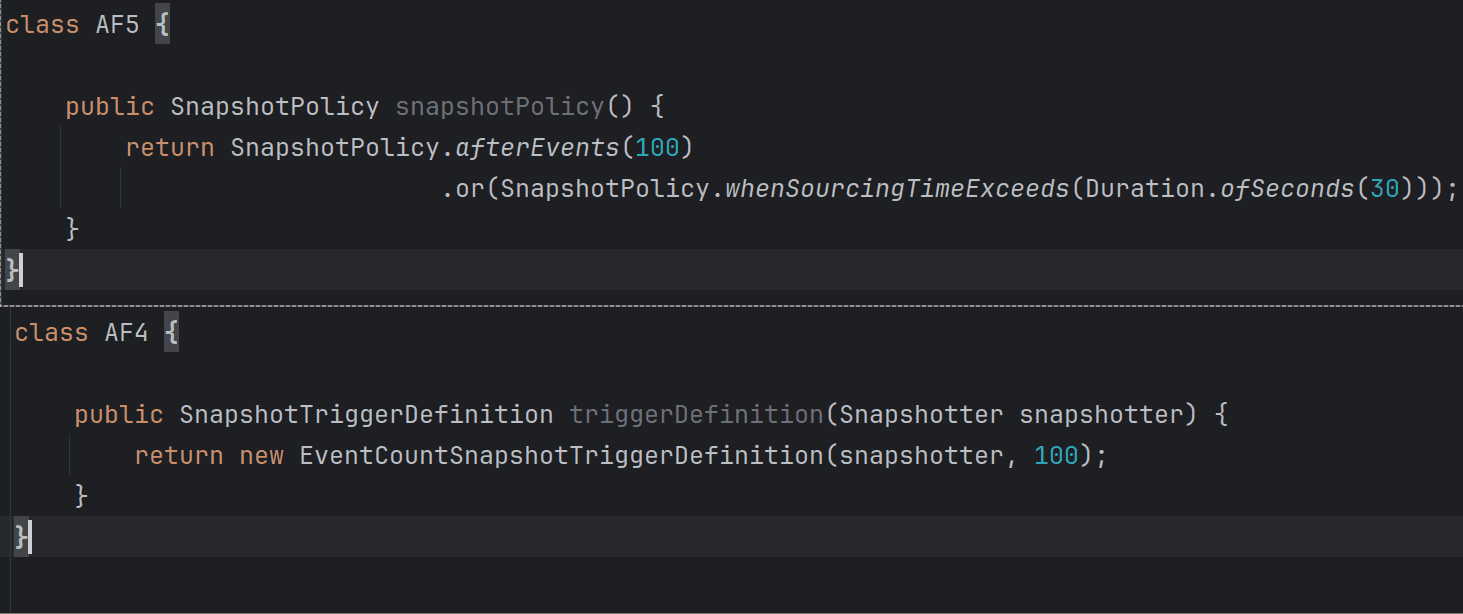
In Axon Framework 4 you defined a SnapshotTriggerDefinition. That API is gone. Axon Framework 5 (and Axoniq Framework, built on top of it) introduces snapshot policies with static factory methods:
If you're using Axoniq Framework, the snapshot store comes out of the box, and on the roadmap we're collapsing the snapshot read + event tail read into a single network call, which further improves performance.
If you're staying on the open source Axon Framework, you can still configure snapshot policies, but you'll need to wire up the snapshot store yourself.
Watch the 2026 Axoniq Updates Video
The full walkthrough of Q1 Axoniq product updates is in this playlist. Steven's segment covers the framework split, the DLQ integration, and the new snapshot policy API.
What's next
The DLQ migration and the snapshot policy redesign are the visible changes within Axon and Axoniq Platform. The invisible change, the split itself, is the bigger story for the next twelve months. With Axoniq Framework as a separate repository, we can ship production-grade modules faster: data protection, advanced workflow primitives (more on those in Axoniq workflows), deeper Postgres integrations, and the extendWith extension mechanism we just introduced for DLQ will carry across all of them.
Ready to start using the new features?
→ Support for Axon Framework 4 ends after June 30. Starting July 1, version 4 stops getting security patches and fixes. Reach out to us if you'd need long-term support for your AF4 to AF5 migration. Book a 30-minute call with an Axoniq engineer.
→ Want to learn more? Read the Axoniq Framework docs.
See it in production
Otto, Nets, MoneyLion, DPG Media and other teams run event-sourced systems in production with Axoniq.


" height="300px" id="PUlF9PxPI" transform="translate(146 0)" width="300px"/><path d="M 0 103.917 L 36.942 1.41 L 61.335 1.41 L 98.136 103.917 L 76.281 103.917 L 66.834 76.845 L 22.701 76.845 L 12.831 103.917 Z M 26.79 65.424 L 62.886 65.424 L 45.12 14.523 Z M 171.284 103.917 L 143.789 63.732 L 114.743 103.917 L 99.938 103.917 L 136.598 53.016 L 101.348 1.41 L 126.164 1.41 L 151.826 38.916 L 178.757 1.41 L 193.562 1.41 L 159.017 49.632 L 196.1 103.917 Z M 297.837 52.734 C 297.837 82.908 280.353 105.468 249.051 105.468 C 217.608 105.468 200.265 82.908 200.265 52.734 C 200.265 22.419 217.608 0 249.051 0 C 280.353 0 297.837 22.419 297.837 52.734 Z M 221.274 52.734 C 221.274 72.897 228.465 93.483 249.051 93.483 C 269.637 93.483 276.828 72.897 276.828 52.734 C 276.828 32.43 269.637 11.985 249.051 11.985 C 228.465 11.985 221.274 32.43 221.274 52.734 Z M 405.589 1.41 L 405.589 103.917 L 382.042 103.917 L 333.256 18.471 L 334.243 103.917 L 314.362 103.917 L 314.362 1.41 L 337.909 1.41 L 386.695 86.715 L 385.708 1.41 Z M 430.77 103.917 L 430.77 1.41 L 450.651 1.41 L 450.651 103.917 Z M 573.246 91.932 L 573.246 105.468 L 516 105.468 C 485.544 105.468 468.06 82.344 468.06 52.311 C 468.06 22.842 484.275 0 516.564 0 C 547.02 0 565.491 21.573 565.491 51.747 C 565.491 69.09 557.877 85.305 545.187 95.034 C 554.352 93.201 563.376 91.932 573.246 91.932 Z M 489.069 52.17 C 489.069 75.153 496.965 94.188 516.564 94.188 C 537.432 94.188 544.482 73.038 544.482 52.311 C 544.482 28.764 535.599 11.985 516.564 11.985 C 497.106 11.985 489.069 30.738 489.069 52.17 Z" fill="rgb(0, 0, 0)" height="105.46799999999996px" id="g7P19tPZB" transform="translate(8.294 399.083)" width="573.2455397949218px"/></svg>)